AI Image Translator
Translate images online for free while preserving the original layout, spacing, and visual details. No redesign needed – just upload, translate, and download. Powered by AI and OCR for clear, reliable results.
 Translate Text in Images for Free With Layout Preserved
 Powered by OCR and AI for Reliable Image Translation
 Translate Image Text Into 65+ Languages
Before & After: Image Translation with layout preserved.
See how the AI Image Translator replaces text directly in images while preserving the original layout, spacing, and visual details. No redesign or manual editing required – just clear, usable translations.
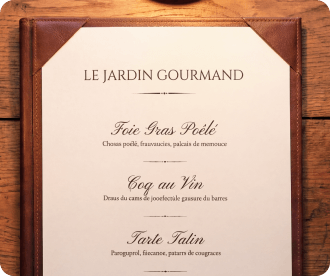
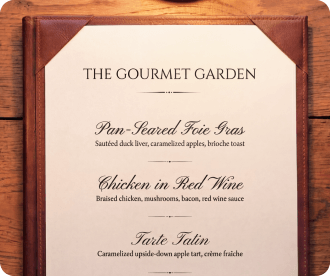
Menu Image Translation
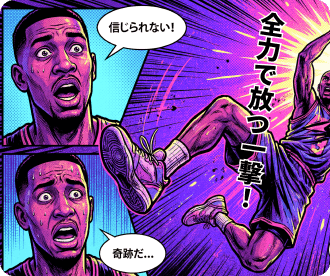
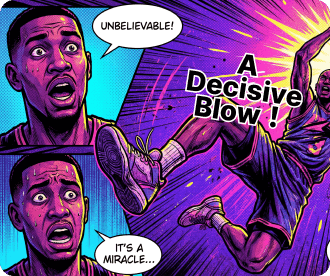
Comic Image Translation
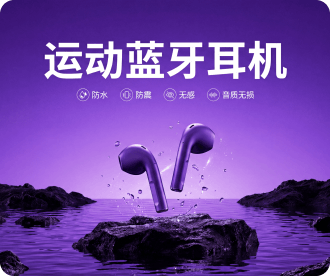

E-Commerce Product Image Translation
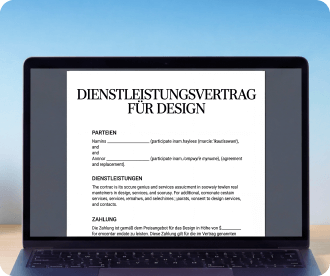
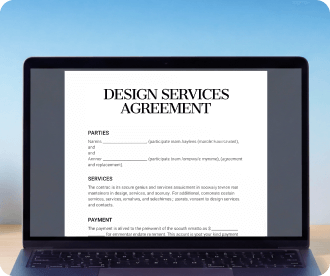
Screenshot Image Translation
How to translate images with AI?
Upload an Image to the AI Translator
Upload any image that contains text, such as menus, screenshots, product images, or posters.
Choose the Language and Translation Mode
Select your target language, then choose AI Precision Translation powered by Nano Banana Pro or Nano Banana 2.
Preview Before Exporting
Preview the translated result, compare it with the original image, or download the translated image.
Why choose HiPDF AI Image Translator?

Free Online Image Translation
Translate images online with free usage available. No installation or setup required.

OCR and AI-Powered for Reliable Results
Combine OCR text recognition with AI-based translation to deliver clear, usable results while preserving the original image structure.

Advanced AI Mode for Complex Background
Powered by Nano Banana Pro and Nano Banana 2, the advanced mode handles complex backgrounds and delivers more accurate, context-aware translations.

Multiple Languages & Text Directions Supported
Translate images into 65+ languages, supporting horizontal, vertical, and mixed text directions for real-world use cases.

Works With Common Image Types
Translate menus, comics, product images, screenshots, posters, and other everyday visuals with confidence.

Guaranteed File Security and Privacy
All uploaded files are automatically and permanently deleted within 60 minutes after processing.
Translate Image into:
FAQs about AI Image Translator.
-
What is an AI Image Translator?An AI Image Translator is a tool that translates text embedded in images into another language. Instead of returning plain text, it replaces the translated text directly within the image while preserving the original layout and visual structure.
-
Is AI Image Translator free to use online?Yes. The AI Image Translator is available online with free usage. You can upload images and translate text directly without installing any software. Please note that free usage may include certain limits. For extended usage or advanced features, additional options may be available.
-
What languages does the AI Image Translator support?
The AI Image Translator supports translation into 65+ languages. It covers many commonly used languages and supports different text directions, including horizontal, vertical, and mixed layouts. The list of supported languages may be updated over time as the service continues to improve.
-
What is the difference between Fast Translation or AI Precision Translation?
Fast Translation is designed for quick and simple translations. It works well for images with clear backgrounds and straightforward text, delivering results in less time.
AI Precision Translation is optimized for more complex images. It provides higher accuracy for images with complex backgrounds, varied fonts, or context-dependent text by using advanced AI models.
-
Can I translate images with vertical text, such as Japanese or Chinese?
Yes. The AI Image Translator supports images with vertical text, including languages such as Japanese and Chinese. It can also handle mixed text directions, combining vertical and horizontal text within the same image.
-
Does AI Image Translator preserve the original image layout?
Yes. The AI Image Translator replaces translated text directly within the image while preserving the original layout, spacing, and visual structure. This allows the translated image to remain clear and visually consistent without requiring manual redesign.

Free PDF tools process PDF tasks online

HiPDF Online Tools quality rating:

4.8
(188,357 Votes)You have to upload and download at least 1 file to rate! We've already perfectly processed 307,292,373 files with a total size of 10,124 TB
Traveler
I just uploaded a menu image and got the translation right away. No app, no setup – exactly what I needed while traveling.
Student
I use it to translate screenshots from my class materials. It’s fast, works online, and is easy to understand.
Online Seller
I use it to translate product images for different markets. I can upload an image and download the translated version without redesigning anything.
Comic Reader
I tried it on a comic image, and the translated text stayed inside the speech bubbles. That’s something most tools don’t handle well.