PDF Agent: AI Agent to Read,
Understand & Analyze PDFs
Automatically Selects the Best AI Model for Every PDF Task.
Use HiPDF Read Agent to read, summarize, analyze, and answer questions from PDFs automatically. Powered by multiple AI models for faster, more accurate results.
 Free AI PDF Agent – Auto-Select Best Model (GPT/Claude/Gemini) for Your Task
 AI Analyze and Read PDF 50% More Accurate, 2x Faster – Real-Time Web Search Powered
 Chat in Your Languages, Get Answers Your Way – 12 Languages, 7 Styles
One AI Agent
Better results for every PDF task.
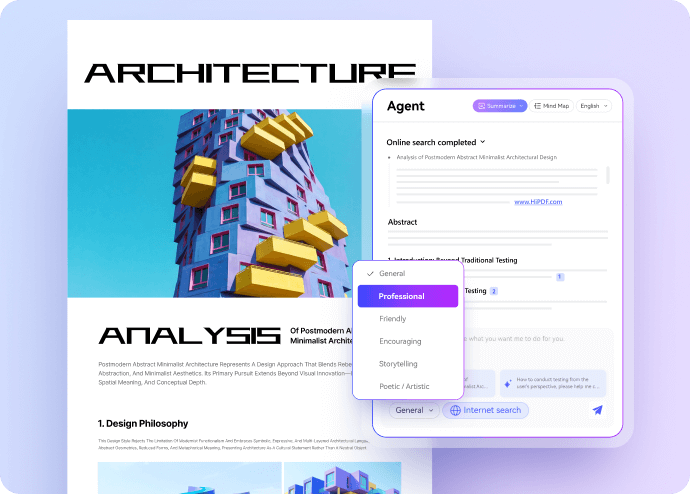
Ask questions and get answers from your PDF
Use plain language to ask questions. The AI Agent reads the entire document, identifies the most relevant sections, and delivers accurate, context-aware answers.
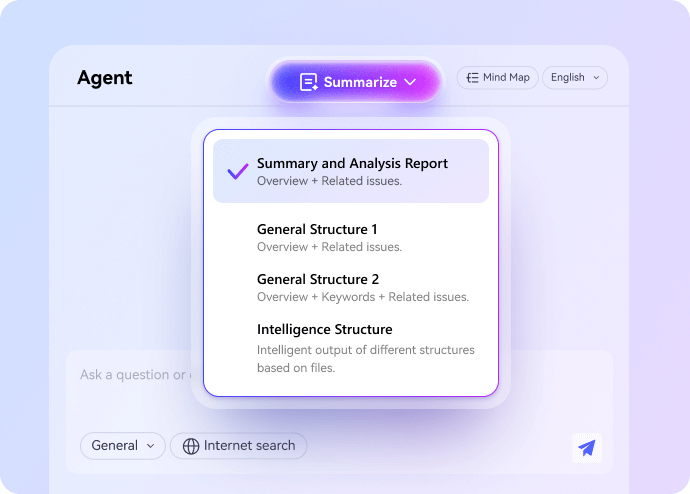
AI summarize PDF with 4 professional modes
Use the AI Agent to summarize PDFs quickly and accurately. Choose from four specialized modes designed for different needs, from business reports to academic research.
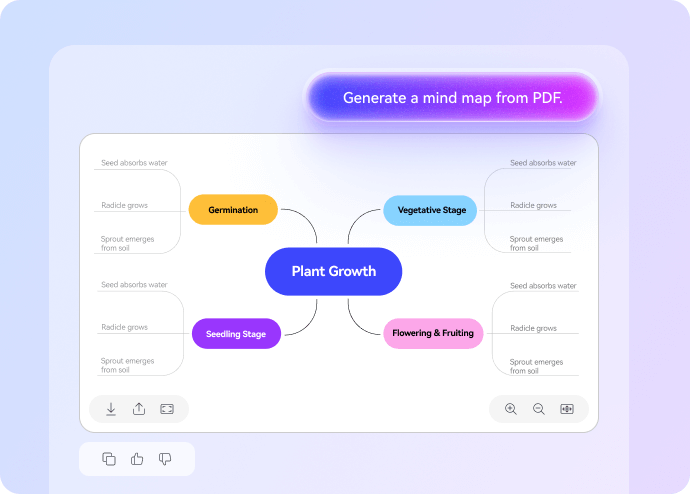
Convert PDFs into clear, visual Mind Maps
Turn PDF content into easy-to-read mind maps. The AI Agent analyzes document structure and automatically creates visual outlines you can review, study, or present.
More than understanding PDFs.
Go beyond AI reading and analysis – organize, annotate, and collaborate on PDFs easily.

Centralize your PDF library in the Cloud
Store and manage PDFs in one secure cloud workspace, always ready to access.

Capture and organize insights as you read.
Create, edit, and save notes alongside your PDFs to build lasting knowledge.

Share insights, not just files with your team.
Share PDFs, summaries, and notes with others to stay aligned and work together.
Why Read Agent delivers better results from PDFs?
More accurate answers and summaries
- Focuses on the most relevant parts of the document.
- Reduces irrelevant or off-topic results.
- Performs reliably with long and complex PDFs.
Faster results, even for large PDFs
- Faster response time for long PDFs.
- No repeated prompting or manual adjustments.
- Get summaries, mind maps, or answers in seconds.
Results grounded in your PDF content
- Answers and summaries tied to document content.
- Clear structure instead of generic AI output.
- More reliable for professional and academic use.
One AI Agent instead of multiple tools
- No need to choose tools or workflows.
- Consistent results across different tasks.
- Requires fewer steps and less setup.
How Read Agent achieves better accuracy and speed.
Read Agent combines multiple leading AI models to deliver faster, more accurate results across PDF tasks.
Upload PDF File
Read Agent analyzes document structure, length, and complexity.
Automatic Model Selection
The system selects the best AI model for your specific task.
Task Execution
Get accurate summaries, answers, or mind maps instantly.
Who uses our AI PDF Agent?
Read Agent is built for anyone who needs to read, analyze, or review PDFs efficiently.
Students, professionals, educators, and researches use it to summarize document, visualize structure, and ask questions with confidence.
Students & Researchers
Read long papers and study materials more efficiently.
- Summarize academic PDFS into clear overviews.
- Turn research papers into visual mind maps.
- Ask questions to understand complex sections.
Popular Styles:
Business Professionals
Work through reports and documents with confidence.
- Extract key insights from reports and proposals.
- Review documents without reading every page.
- Prepare summaries for presentations and meetings.
Popular Styles:
Content Creators
Turn long documents into clear, usable content.
- Summarize PDFs into blog-ready or script-ready content.
- Extract key points and ideas for articles or posts.
- Understand source materials quickly without reading every page.
Popular Styles:
Legal & Compliance
Handle complex and detail-heavy documents with confidence.
- Find answers in long manuals and policies.
- Spend less time searching through PDFs.
- Improve accuracy when reviewing documents.
Popular Styles:
FAQs about AI Read Agent for PDFs.
-
What is Read Agent?Read Agent is an AI-powered PDF assistant that helps you summarize documents, convert PDFs into mind maps, ask questions, and manage your PDF knowledge – all in one workflow.
-
Is Read Agent free to use?Yes. Read Agent offers a free version with basic features available at no cost. You can get started without payment, while advanced tools or higher usage limits may require an upgrade, depending on your needs.
-
How is Read Agent different from other AI PDF tools?
Read Agent focuses on understanding and summarizing PDFs rather than just editing them. It uses AI to extract key insights, answer questions, and explain complex content, making it more suitable for reading, studying, and research compared with traditional PDF tools.
-
Do I need to choose an AI model manually?
No. Read Agent automatically selects the most suitable AI model for each task. You can upload your PDF and start asking questions right away without configuring models or adjusting technical settings.
-
What PDF tasks can I do with Read Agent?
Read Agent helps you read and understand PDFs faster. You can summarize documents, ask questions, extract key points, explain complex sections, and analyze reports or papers using AI, without editing or converting the original PDF.
-
What is the Knowledge Space?
The Knowledge Space is where Read Agent organizes your uploaded PDFs and extracted insights. It keeps documents, summaries, and answers in one place, helping you review content, track understanding, and build knowledge across multiple files efficiently.
-
Can I create and save notes?
Yes. Read Agent lets you create and save notes while reading PDFs. You can highlight key points, record insights, and keep notes linked to each document, making it easier to review information, study materials, or reference content later.
-
Can I share my PDFs or results with others?
Yes. Read Agent lets you share PDFs, summaries, and AI-generated insights with others. You can easily share results with teammates or classmates to support collaboration, review, or discussion without resending the entire document.
-
Is my PDF content secure?
Yes. Read Agent protects your PDF content with secure data handling. Files are processed safely, used only for your requests, and not shared with others. Access controls help ensure your documents and AI-generated results remain private.

Free PDF Tools Process PDF Tasks online

HiPDF Online Tools quality rating:

4.8
(188,357 Votes)You have to upload and download at least 1 file to rate! We've already perfectly processed 307,292,373 files with a total size of 10,124 TB
Student
The mind map feature makes complex papers much easier to review before exams.
Content Writer
I use Read Agent to break down long PDFs into clear ideas for articles and scripts. It saves me a lot of research time.
Legal Consultant
Ask PDF helps me locate specific clauses in long policy documents without manual searching.
Business Analyst
Read Agent helps me quickly extract key insights from reports without reading every page.