Compress PDF to 100KB Online for Free
Need a PDF under a strict size limit? Compress PDF to 100KB with accurate size targeting and smart optimization. Reduce PDF size to 100KB or convert PDF size to 100 KB while keeping text readable, images clear, and formatting stable.
 Free Online PDF Compression
With No Sign-Up
 Exact Size Control to Convert PDFs
to 100 KB
 Aggressive Compression
That Stays Readable
How to Compress PDF to 100KB Online?
Reduce PDF size to 100KB online for free with adjustable compression levels or a precise 100 KB target—all in a few simple steps, with clean output you can upload confidently.
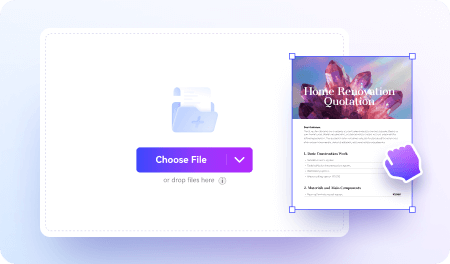
Upload your PDF file to the online PDF compressor.
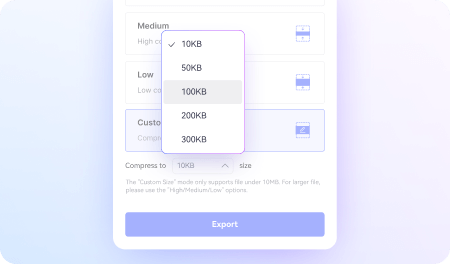
Set your target size as 100KB to start the PDF compression.
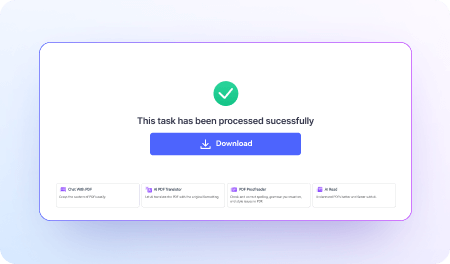
Click Compress to get your reduced PDF instantly.
FAQs about Compressing PDFs to 100KB Online.
-
How do I control my PDF size to stay under 100KB?
Reaching 100KB usually requires adjusting compression strength rather than applying default settings.
Start with medium compression, check the output size, then increase the compression level if necessary. Tools like HiPDF PDF Compressor allow progressive compression so you can gradually reduce the file without over-compressing in one step.
-
What type of PDF can realistically be reduced to 100KB?
Not all PDFs can reach 100KB.
Single-page, text-based documents have the highest success rate.
Scanned images, colored backgrounds, or embedded graphics dramatically increase file size. In such cases, converting images to grayscale before compression improves the chances. HiPDF handles image-heavy files better by optimizing internal image data.
-
Will a 100KB PDF still pass online verification systems?
Most platforms only check file size, not compression method.
As long as the file remains readable and under 100KB, it should upload successfully. Before submission, preview the compressed version to ensure text clarity. Using a reliable tool like HiPDF PDF Compressor helps balance size reduction and legibility.
More than a PDF to 100KB compressor.
Supercharge your PDF processing with AI.

Free online PDF tools for all purposes

HiPDF Online Tools quality rating:

4.8
(188,357 Votes)You have to upload and download at least 1 file to rate! We've already perfectly processed 307,292,373 files with a total size of 10,124 TB
Oliver R.
Operations Analyst
"A government portal rejected anything over 100 KB, and I couldn’t afford multiple retries. This let me compress PDF to 100KB quickly and the text stayed readable. It saved me a lot of stress."
Sophie M.
University Lecturer
"Our LMS has a surprisingly low upload limit, so I often need PDFs compressed to 100 KB. This tool made the result predictable instead of guesswork. I can finally upload materials without errors."
Ethan C.
Scholarship Applicant
"I had to submit several documents under 100 KB each, and the site wouldn’t accept anything larger. This reduced everything fast and the pages were still clear enough to review. Honestly, it was a relief."